[withoutCRA1] CRA없이 React앱 구성하기
Lets develope a very primitive style react app without Babel and Webpack in this chapter
first, simply setup index.html file with basic html structure
Use CDN to load React and ReactDom packages
why? -> to setup the simplest form of react app
Unpkg.com provide packages as form of cdn which is registered in npm
1
2
3
4
5
6
7
8
9
10
11
<!DOCTYPE html>
<html>
  <head>
    <title>React App without CRA</title>
    <script src="https://unpkg.com/react@18.3.1/umd/react.production.min.js"></script>
    <script src="https://unpkg.com/react-dom@18.3.1/umd/react-dom.production.min.js"></script>
  </head>
  <body>
    <div id="root"></div>
  </body>
</html>
Now, we can see script is loaded properly in Network tab 
Also, we can check in console React and ReactDOM is properly assigned to global object 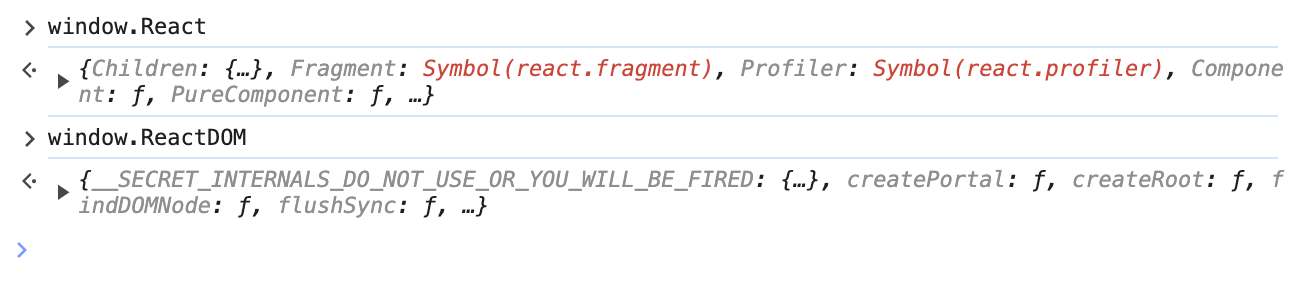
Using CRA, like below index.js is made basically.
1
2
3
4
5
6
7
8
9
10
11
12
13
14
15
//index.js
import React from "react";
import ReactDOM from "react-dom/client";
import "./index.css";
import App from "./App";
import reportWebVitals from "./reportWebVitals";

const root = ReactDOM.createRoot(document.getElementById("root"));
root.render(
  <React.StrictMode>
    <App />
  </React.StrictMode>
);

reportWebVitals();
Now, lets apply it to <script> tag in index.html
1
2
3
4
5
6
7
8
9
10
11
12
13
14
15
16
17
18
19
20
21
22
<!DOCTYPE html>
<html>
  <head>
    <title>React App without CRA</title>
    <script src="https://unpkg.com/react@18.3.1/umd/react.production.min.js"></script>
    <script src="https://unpkg.com/react-dom@18.3.1/umd/react-dom.production.min.js"></script>
  </head>
  <body>
    <div id="root"></div>
    <script>
      const App = () => {
        return <h1>HELLO REACT WORLD</h1>;
      };
      const root = ReactDOM.createRoot(document.getElementById("root"));
      root.render(
        <React.StrictMode>
          <App />
        </React.StrictMode>
      );
    </script>
  </body>
</html>
- define App component
- show text in h1 tag
- find element which has id ‘root’ in index.html
- and assign it to variable ‘root’
- then, render
component in root
But, contrary to expectations, syntax error is occured 
-> Why this error is occured? : <tag> syntax is not traditional syntax for javascript.
This is JSX syntax. So we should create component without using JSX -> React::createElement function help it.
createElement(tag, props, children): props can benull
This is modified code part:
1
2
3
4
5
6
7
8
9
...
<script>
  const App = () => React.createElement('h1', null, "Hello React World!");
  ReactDOM.render(
    React.createElement(App),
    document.getElementById("root")
  );
</script>
...
Now, as we expected, message is shown well.