[withoutCRA3] CRA없이 React앱 구성하기
Build-time Transpile
In this chapter, lets guarantee script being transfered in build time
install Modules
To this, we should install 3 libraries using npm
- @babel/cli #to excute babel in build time
- @babel/core # to excute babel in build time
- @babel/preset-react # to transpile react syntax to javascript
1
2
3
4
@babel/preset-react example
<h1>"Hello World"</h1>
----- @babel/preset-react ----->
React.createElement('h1', null, 'Hello World')
1
2
#install command
npm install --save-dev @babel/cli @babel/core @babel/preset-react
After install these libraries, we can see node_modules directory is added. 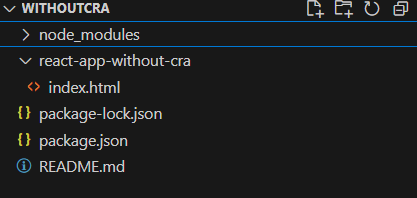
And because of this big size, it is convention to not add node_modules folder to repository.
So, It is recommended step to not add this dir to repo.
- create
.gitignorein root dir- input node_modules in
.gitignorefile.- check if this folder is excluded in tracking files by enter the command
git status
Setup Babel
configuration
Babel read .babelrc during execution. So we should create this file and add appropriate properties. In this case, we need add presets property as @babel/preset-react
1
2
3
4
#.babelrc
{
    "preset": ["@babel/preset-react"]
}
Make dir structure to build
- make directory
srcin root- create
app.jsin src folder- move scripts from
index.htmltoapp.js
Make Build script
- open
package.json- add property
scripts- define command
"build": "babel src --out-dir dist"
After all of this step, we can build
1
2
3
4
5
6
7
8
#input
> npm run dev

#output
> build
> babel src --out-dir dist

Successfully compiled 1 file with Babel (2824ms).
And we can see new app.js file is made in dist directory.
1
2
3
4
5
6
7
// src/app.js
const App = () => <h1>Hello React World with JSX!</h1>;
ReactDOM.render(<App />, document.getElementById("root"));
// -------> babel
// dist/app.js
const App = () => /*#__PURE__*/React.createElement("h1", null, "Hello React World with JSX!");
ReactDOM.render( /*#__PURE__*/React.createElement(App, null), document.getElementById("root"));
Modify index.html use dist-script
Finally, we can use pre-transfered script instead of live-browser-transfer!
lets make index.html use script in dist directory
Babel CDN no more need in index.html
1
2
3
4
5
6
7
8
9
10
11
12
13
<!DOCTYPE html>
<html>
  <head>
    <title>React App without CRA</title>
    <script src="https://unpkg.com/react@18.3.1/umd/react.production.min.js"></script>
    <script src="https://unpkg.com/react-dom@18.3.1/umd/react-dom.production.min.js"></script>
  </head>
  <body>
    <div id="root"></div>
    <script src="dist/app.js">
    </script>
  </body>
</html>
we can modify index.html :: script like above one. Then, we can see warning message clearly removed
Generally, this kind of transpile process is operated with bundler like webpack
At next chapter, we’ll learn What is bundler?, Why Babel should be operated with bundler?