[withoutCRA4] CRA없이 React앱 구성하기
Applcation of Webpack
According to Babel’s official site, babel commonly not used independently but used with bundler
So at this chapter, let we learn about What is bundler? and set bundling configuration
Why bundling?
In previous chapter, we used only one file app.js. But in real-world, it is generall to not integrate all of logic to one file. Because maintenance be harder.
But in the environment of executing application, generally it is profitable that minimizing the number of files
Why? lets check with example
Make simple caclulator
Assume we are higly focus on independency of source codes.
So, we made 4 files in which each file has its own function
1
2
3
4
5
6
7
8
9
10
11
12
13
14
15
16
// @/src/utils/add.js
export const addNumbers = (num1, num2) => {
    return num1 + num2;
}
// @/src/utils/divide.js
export const divideNumbers = (num1, num2) => {
    return num1 / num2;
}
// @/src/utils/multiply.js
export const multiplyNumbers = (num1, num2) => {
    return num1 * num2;
}
// @/src/utils/subtract.js
export const subtractNumbers = (num1, num2) => {
    return num1 - num2;
}
And, import these 4 modules in app.js file
1
2
3
4
5
6
7
8
9
10
11
12
13
14
// @/src/app.js
import { addNumbers } from "./utils/add";
import { divideNumbers } from "./utils/divide";
import { multiplyNumbers } from "./utils/multiply";
import { subtractNumbers } from "./utils/subtract";

console.log(addNumbers(1,1));
console.log(divideNumbers(1,1));
console.log(multiplyNumbers(1,1));
console.log(subtractNumbers(1,1));

const App = () => <h1>This is React Calculator</h1>;
ReactDOM.render(<App />, document.getElementById("root"));
Oops, import error occured. This error message means we can’t use import statement in not-ES module 
It can be easily solved by add type="module" in <script> tag
1
2
3
4
5
6
7
8
9
10
11
12
13
14
15
<!--index.html-->
<!DOCTYPE html>
<html>
    <head>
        <title>React Calculator</title>
        <script src="https://unpkg.com/react@18.3.1/umd/react.production.min.js"></script>
        <script src="https://unpkg.com/react-dom@18.3.1/umd/react-dom.production.min.js"></script>
    </head>
    <body>
        <div id="root"></div>
        <script src="dist/app.js" type="module">
        </script>
    </body>
</html>
Now, we can see expected result in console. 
It looks everything is Okay. whats the matter??
lets see Network component in developer tool 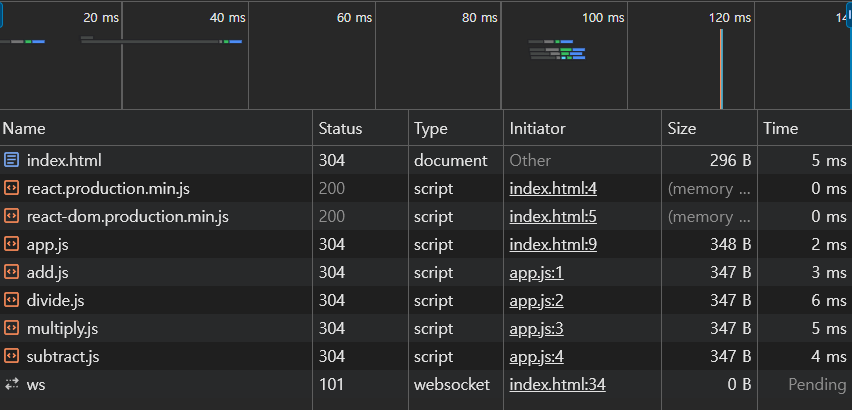
We can see So many files are loaded through HTTP request
You may know the more request, the more waste of resources
So, In developing step, we seperate codes to get advantages of maintenence, but in application operating step, it is unnecessary!
-> To minimize HTTP request, it is important that integrating seperated modules : This process called Bundling
Use Bundler (Webpack)
Config webpack
we need two packages to execute webpack in build-time.
And one more package is needed to integrate webpack with babel
1
npm install --save-dev webpack webpack-cli babel-loader
Like Babel, webpack also has own config file webpack.config.js
Webpack is run in Node.js build env. So we should write up with commonJS syntax
1
2
3
4
5
6
7
8
9
10
11
12
13
14
15
16
17
18
19
20
21
// webpack.config.js
const path = require("path");

module.exports = {
    entry: "./src/app.js", //start point
    output: { // bundling result directory : pros : filename, path
        path: path.resolve(__dirname, "dist"),
        filename: "bundle.js",
    },
    module: { // how handle diverse file extensions
        rules:[ //Array : each extensions handle method
            {
                test: /\.js$/, //regexp
                exclude: /node_modules/, //node_modules is already built as runnable
                use: {
                    loader: "babel-loader", //preprocess with babel-loader
                },
            },
        ],
    },
};
Webpack can only handle javascript code in bundling process. So we need preprocess which is handled with loader
Then, modify package.json build command to use webpack
1
2
// package.json
"build": "webpack"
Now, as we enter npm run build in shell, we can see new file(bundle.js) is created in dist directory.
Then, also we can modify index.html to use bundle.js
1
2
3
4
5
6
7
8
9
10
11
12
13
14
<!-- index.html -->
<!DOCTYPE html>
<html>
    <head>
        <title>React Calculator</title>
        <script src="https://unpkg.com/react@18.3.1/umd/react.production.min.js"></script>
        <script src="https://unpkg.com/react-dom@18.3.1/umd/react-dom.production.min.js"></script>
    </head>
    <body>
        <div id="root"></div>
        <script src="dist/bundle.js" type="module">
        </script>
    </body>
</html>
Finally, let’s check network tab… 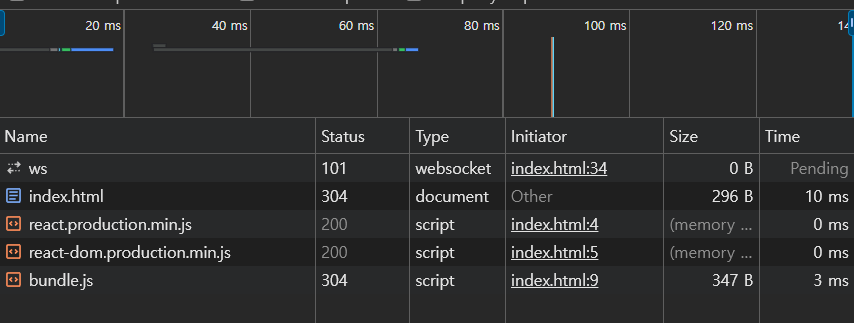
Yeah! we can see the number of loaded script files are decreased. This is Why we need Bundler
Notice that build files like
dist/*is also conventionally excluded from repository. So add it to.gitignore
When we enter the command npm run build, we can see warning message 
Lets learn about extra webpack configuration including mode setting.